
Introduction
- Huge thank to @tr4c3datr4il for giving me the opportunity to solve these challenges despite me not participating in the contest.
Case Charlie

Question 1
[1]. What was the last time the suspect logged into the server? (UTC / 24 hours format)
Format: YYYY-MM-DD HH:MM:SS
==>- Mounting the disk image gives us a Linux filesystem. A quick look in
/hometells us that the user isubuntu. - To check the latest login time, we can check
/var/log/wtmp- this file is used on Unix-like systems to keep track of all logins and logouts to the system. (Source: https://en.wikipedia.org/wiki/Utmp )
$ utmpdump /var/log/wtmp
...
[7] [18760] [ts/2] [ubuntu  ] [pts/2       ] [192.168.237.1       ] [192.168.237.1  ] [2025-11-08T04:32:56,723780+00:00]
...Answer: 2025-11-08 04:32:56
Question 2
[2]. The suspect used a chat application to communicate. What is the name of this application?
Format: chatapp. Example: whatsapp, telegram, Discord
==>- A look inside
/home/ubuntugives us an IRC chatlog and a configuration directory for Irssi - an IRC client.
$ ls -a
.
├── .irssi
└── irclogsAnswer: irssi
Question 3
[3]. Identify the usernames (handles) of the suspect and their contact in the chat application. (Case Sensitive)
Format: uS3rNaME13, c0nT4cTn4m3
==>- Now we need to check out the IRC chatlog inside
/home/ubuntu/irclogs/liberachat/the0nlymak3r1338.log. Which reads:
...
12:56 -!- Irssi: Starting query in liberachat with the0nlymak3r1338
...
--- Log opened Sat Nov 08 04:33:46 2025
04:33 <the0nlymak3r1338> have you read this
04:33 <the0nlymak3r1338> https://x.com/CryptoCyberia/status/1986547976555151447
04:34 <s3v3n_wOndEr113> yea, crazy right
04:34 <the0nlymak3r1338> yup
04:34 <the0nlymak3r1338> luckily, you have your own server
04:35 <s3v3n_wOndEr113> O_O
04:36 <s3v3n_wOndEr113> oh shit
04:36 <the0nlymak3r1338> what- From this line:
Starting query in liberachat with the0nlymak3r1338, we can safely say that our suspect iss3v3n_wOndEr113and their contact isthe0nlymak3r1338.
Answer: s3v3n_wOndEr113, the0nlymak3r1338
Question 4
[4]. What was the last time the suspect sent a message to their contact? (UTC / 24 hours format)
Format: YYYY-MM-DD HH:MM
==>- Rechecking the chatlog:
--- Log opened Sat Nov 08 04:33:46 2025
04:33 <the0nlymak3r1338> have you read this
04:33 <the0nlymak3r1338> https://x.com/CryptoCyberia/status/1986547976555151447
04:34 <s3v3n_wOndEr113> yea, crazy right
04:34 <the0nlymak3r1338> yup
04:34 <the0nlymak3r1338> luckily, you have your own server
04:35 <s3v3n_wOndEr113> O_O
04:36 <s3v3n_wOndEr113> oh shit
04:36 <the0nlymak3r1338> what- We can see that the log was recorded on
Nov 08 2025 - The last message the suspect sent to their contact was at
04:36
Answer: 2025-11-08 04:36
Question 5
[5]. What command did the suspect use to overwrite the current user's .bash_history file to cover their tracks?
==>- Checking both
/home/ubuntu/.bash_historyand/root/.bash_historytells us that both files has been wiped. To remove/root/.bash_history, you would need root permission. Which we can trace with SystemD’s journal. - We can use
systemctlorgo-journalctl(Which doesn’t require SystemD) to read the log stored in/var/log/journal/3f430965a019473c8245e89118d5a257/user-1000.journal
$ ~/Lab/Source/External/go-journalctl/go-journalctl cat user-1000.journal | jq | grep CMDLINE
...
"_CMDLINE": "sudo shred -vfz /home/ubuntu/.bash_history",
    "_CMDLINE": "sudo shred -vfz /home/ubuntu/.bash_history",
    "_CMDLINE": "sudo shred -vfz /home/ubuntu/.bash_history",
    "_CMDLINE": "sudo rm -f /home/ubuntu/.bash_history",
    "_CMDLINE": "sudo rm -f /home/ubuntu/.bash_history",
    "_CMDLINE": "sudo rm -f /home/ubuntu/.bash_history",
...- Here, the suspect used
shredto overwrite the file’s data, making it impossible to recover.
Answer: sudo shred -vfz /home/ubuntu/.bash_history
Question 6
[6]. The suspect accidentally left behind an email address. What is the email address?
Format: name@domain. Example: this_Is_an_3xample_email1213@proton.me
==>- Looking back at the chatlog, the suspect was building some sort of image.
--- Log opened Sat Nov 08 04:02:03 2025
04:02 -!- Irssi: Starting query in liberachat with the0nlymak3r1338
04:02 <s3v3n_wOndEr113> hi
04:02 <the0nlymak3r1338> yo i see you now
04:02 <the0nlymak3r1338> what happened
04:02 <s3v3n_wOndEr113> my nickname messed up
04:02 <the0nlymak3r1338> lol
04:03 <the0nlymak3r1338> anyway
04:03 <the0nlymak3r1338> ive built an image
04:03 <the0nlymak3r1338> somegroup5803945/jkfhskdf2314
04:03 <s3v3n_wOndEr113> cool bro
04:03 <s3v3n_wOndEr113> let me try it
04:03 <the0nlymak3r1338> yeah it just testing
04:03 <the0nlymak3r1338> use 'testing' to pull it
04:03 <s3v3n_wOndEr113> okay
04:04 <s3v3n_wOndEr113> old cred?
04:04 <the0nlymak3r1338> yeah same old cred mate
04:04 <the0nlymak3r1338> ^_^
04:04 <s3v3n_wOndEr113> i see
--- Log closed Sat Nov 08 04:09:33 2025somegroup5803945/jkfhskdf2314is believed to be a Docker Image from the artifacts in/home/ubuntu
$ ls
.
├── ...
├── .docker
└── get-docker.sh- To pull this image for inspection, we need the right credentials, which we can find in
/home/ubuntu/.docker/config.json, which gives us a Gitlab Registry Token.
$ cat /home/ubuntu/.docker/config.json
{
	"auths": {
		"registry.gitlab.com": {
			"auth": "YXNqZGtodWZoODMyOmdscGF0LXh3Z2hRYkRUc0piczFCMk11Ylhfekc4Nk1RcDFPbWx4T0hWekN3LjAxLjEyMHl2dHAyZg=="
		}
	}
}- We can copy this file to our environment, which we can then pull the image.
- According to the suspect:
04:03 <the0nlymak3r1338> use 'testing' to pull it, we have to pull thetestingbranch.
 $ docker pull registry.gitlab.com/somegroup5803945/jkfhskdf2314:testing
testing: Pulling from somegroup5803945/jkfhskdf2314
sha256:10c5645d93f00835d09b6b78fad0a06b52b103ab7d26c549597a9a2c508c7482
Status: Downloaded newer image for registry.gitlab.com/somegroup5803945/jkfhskdf2314:testing
registry.gitlab.com/somegroup5803945/jkfhskdf2314:testing- Now we will inspect the image.
$ docker history registry.gitlab.com/somegroup5803945/jkfhskdf2314:testing
IMAGE          CREATED       CREATED BY                                      SIZE      COMMENT
c2b85aaba122   2 weeks ago   CMD ["nginx" "-g" "daemon off;"]                0B        buildkit.dockerfile.v0
<missing>      2 weeks ago   EXPOSE &{[{{11 0} {11 0}}] 0xc0019dbb00}        0B        buildkit.dockerfile.v0
<missing>      2 weeks ago   RUN /bin/sh -c rm -rf /src/web_src/ # buildk…   0B        buildkit.dockerfile.v0
<missing>      2 weeks ago   COPY web_src/*.html /usr/share/nginx/html/ #…   24.1kB    buildkit.dockerfile.v0
<missing>      2 weeks ago   ADD web_src/ /src/web_src/ # buildkit           68.5kB    buildkit.dockerfile.v0
<missing>      2 weeks ago   WORKDIR /src                                    0B        buildkit.dockerfile.v0
<missing>      4 weeks ago   RUN /bin/sh -c set -x     && apkArch="$(cat …   40.3MB    buildkit.dockerfile.v0
<missing>      4 weeks ago   ENV NJS_RELEASE=1                               0B        buildkit.dockerfile.v0
<missing>      4 weeks ago   ENV NJS_VERSION=0.9.4                           0B        buildkit.dockerfile.v0
<missing>      4 weeks ago   CMD ["nginx" "-g" "daemon off;"]                0B        buildkit.dockerfile.v0
<missing>      4 weeks ago   STOPSIGNAL SIGQUIT                              0B        buildkit.dockerfile.v0
<missing>      4 weeks ago   EXPOSE map[80/tcp:{}]                           0B        buildkit.dockerfile.v0
<missing>      4 weeks ago   ENTRYPOINT ["/docker-entrypoint.sh"]            0B        buildkit.dockerfile.v0
<missing>      4 weeks ago   COPY 30-tune-worker-processes.sh /docker-ent…   4.62kB    buildkit.dockerfile.v0
<missing>      4 weeks ago   COPY 20-envsubst-on-templates.sh /docker-ent…   3.02kB    buildkit.dockerfile.v0
<missing>      4 weeks ago   COPY 15-local-resolvers.envsh /docker-entryp…   389B      buildkit.dockerfile.v0
<missing>      4 weeks ago   COPY 10-listen-on-ipv6-by-default.sh /docker…   2.12kB    buildkit.dockerfile.v0
<missing>      4 weeks ago   COPY docker-entrypoint.sh / # buildkit          1.62kB    buildkit.dockerfile.v0
<missing>      4 weeks ago   RUN /bin/sh -c set -x     && addgroup -g 101…   4.21MB    buildkit.dockerfile.v0
<missing>      4 weeks ago   ENV DYNPKG_RELEASE=1                            0B        buildkit.dockerfile.v0
<missing>      4 weeks ago   ENV PKG_RELEASE=1                               0B        buildkit.dockerfile.v0
<missing>      4 weeks ago   ENV NGINX_VERSION=1.29.3                        0B        buildkit.dockerfile.v0
<missing>      4 weeks ago   LABEL maintainer=NGINX Docker Maintainers <d…   0B        buildkit.dockerfile.v0
<missing>      7 weeks ago   CMD ["/bin/sh"]                                 0B        buildkit.dockerfile.v0
<missing> 7 weeks ago ADD alpine-minirootfs-3.22.2-x86_64.tar.gz /… 8.32MB buildkit.dockerfile.v0- From the history logs, we can see that the suspect added
/src/web_src(likely from a git repository), then copy that to/usr/share/nginx/html/. - To inspect the image, we can use
dive(https://github.com/wagoodman/dive) .
- To inspect the image, we can use

- We can see the git repository before it was deleted.
- Now we have to save the Docker Image and inspect the git repo with
docker-layer-extract(https://github.com/micahyoung/docker-layer-extract ) and the ID:e25ae0b9c3c3d3d16f1096c85e47222a1ca1c5db68d01c7f6fb8faf4765ea20f.
$ docker save registry.gitlab.com/somegroup5803945/jkfhskdf2314:testing -o image.tar

$ docker-layer-extract --imagefile image.tar extract --layerid e25ae0b9c3c3d3d16f1096c85e47222a1ca1c5db68d01c7f6fb8faf4765ea20f --layerfile layer.tar

$ tar -xf layer.tar- Now we can extract the email address with
git log
$ cd ./src/web_src

$ git log
commit c5d658cf17134c548bb161a0ea74faef94cea9b9
Author: jkahsd <phuchungh96@gmail.com>
Date:   Fri Nov 7 19:08:43 2025 +0700

    add src code

commit 56a1f5fa74d2d6625b54f774f5343c3e37755ec9
Author: Phuc Hung Huynh <phuchungh96@gmail.com>
Date:   Fri Nov 7 12:03:43 2025 +0000

Initial commitAnswer: phuchungh96@gmail.com
Conclusion
$ nc 127.0.0.1 1259
== proof-of-work: disabled ==

    Welcome to Case Charlie! Answer 6/6 questions correctly to get the flag.
    You will be timed out for increasing duration after every 5 wrong submissions.

[1]. What was the last time the suspect logged into the server? (UTC / 24 hours format)
Format: YYYY-MM-DD HH:MM:SS
==> 2025-11-08 04:32:56
CORRECT!
[2]. The suspect used a chat application to communicate. What is the name of this application?
Format: chatapp. Example: whatsapp, telegram, Discord
==> irssi
CORRECT!
[3]. Identify the usernames (handles) of the suspect and their contact in the chat application. (Case Sensitive)
Format: uS3rNaME13, c0nT4cTn4m3
==> s3v3n_wOndEr113, the0nlymak3r1338
CORRECT!
[4]. What was the last time the suspect sent a message to their contact? (UTC / 24 hours format)
Format: YYYY-MM-DD HH:MM
==> 2025-11-08 04:36
CORRECT!
[5]. What command did the suspect use to overwrite the current user's .bash_history file to cover their tracks?
==> sudo shred -vfz /home/ubuntu/.bash_history
CORRECT!
[6]. The suspect accidentally left behind an email address. What is the email address?
Format: name@domain. Example: this_Is_an_3xample_email1213@proton.me
==> phuchungh96@gmail.com
CORRECT!
Congrats! Here is your flag: CSCV{fakeflagnotrealflagiwasntinthechallenge:(}Case Beta

Question 1
[1]. The suspect used some chat applications. Provide the name of them in alphabetical order separated by comma.
Format: app1, app2, app3. Example: discord, telegram, whatsapp
==>- Going into
C:\Users\windows\Downloads, we can see several installers.
$ ls -a --tree --level 1
.
├── 7z2501-x64.exe
├── Bitwarden-Installer-2025.10.0.exe
├── ChromeSetup.exe
├── DeltaChat Installer.exe
├── desktop.ini
├── EGOPlayInstaller5.0.1.exe
├── Git-2.51.0-64-bit.exe
├── KeePass-2.59-Setup.exe
├── LegacyLauncher.exe
├── OfficeSetup(1).exe
├── OfficeSetup(2).exe
├── OfficeSetup.exe
├── revosetup.exe
├── SDelete
├── SDelete.zip
├── setup-qtox-x86_64-release.exe
├── SteamSetup.exe
└── VSCodeUserSetup-x64-1.104.1.exe- Here we can see 2 chat applications, DeltaChat and qTox.
Answers: DeltaChat, qTox
Question 2
[2]. In the first chat application in Q2, what is the username (handle) of the suspect and their contact? (Case Sensitive)
Format: uS3rNaME13, c0nT4cTn4m3
==>- DeltaChat stores it’s chatlogs under
C:\Users\windows\AppData\Local\Packages\merlinux.DeltaChat_v2ry5hvxhdhyy\LocalCache\Local\DeltaChat\accounts\a666df07-4a7c-4beb-8ba2-adb265dc53ec\dc.db - Inside the
chatstable, we can see that the suspect’s contact istheh1dd3n0ne

- Inside the
messagestable, we can see the suspect’s username isweirdestasian1661

Answer: weirdestasian1661, theh1dd3n0ne
Question 3
[3]. What was the first time the suspect received a message from their contact in Q2? (UTC / 24 hours format)
Format: YYYY-MM-DD HH:MM:SS
==>- Inside the same chatlog, we can see the timestamp of the first message.

Answer: 2025-11-02 05:08:25
Question 4
[4]. Two suspects were talking about a location to receive a package. Provide the address mentioned in the chat.
Format: full address. Example: 123 Example St, Example City, EX 12345
==>- Inside the same chatlog, we can see the meetup location.

Answer: Insert Coin Arcade, Rockford Hills
Question 5
[5]. The suspect has an email address. What is the email address?
Format: name@domain. Example: user@example.com
==>- Looking back at our Artifacts inside
Downloads, we can see the suspect uses Bitwarden - a password manager that requires the user email to use as salt. - Bitwarden stores it’s data inside
C:\Users\windows\AppData\Roaming\Bitwarden\data.json, which contains the suspect’s email.
"global_loginEmail_storedEmail": "nvu960282@gmail.com",Answer: nvu960282@gmail.com
Question 6
[6]. The suspect had a credential of a black market website. What is the credential?
Format: username:password
==>- This requires us to know the pin to the Bitwarden’s
data.jsonhinted insideapp.log:
[2025-11-10 00:46:06.501] [info]  [Pin Service] deriving pin key took 527ms
[2025-11-10 00:46:06.520] [info]  Vault unlocked 2025-11-10T08:46:06.535Z
[2025-11-10 00:46:07.111] [info]  [Pin Service] deriving pin key took 555ms
[2025-11-10 00:46:07.489] [info]  [LockComponent] Sync took 339ms
[2025-11-10 00:46:07.489] [info]  [LockComponent] Private key regeneration took 0ms
[2025-11-10 00:46:07.549] [info]  [CipherService]: decrypt complete took 1.9000000001396984 [ [ 'Items', 2 ] ]
[2025-11-10 00:46:07.603] [info] [SearchService]: index complete took 53.800000000046566 [ [ 'Items', 2 ] ]- Searching inside
Documentsgives us a peculiar directory:One> **Note Notebooks, which the suspect may have used to store the password somewhere. - A quick search inside
C:\Users\windows\AppData\Local\Microsoft\One> **Note\16.0\Memorygive us the OneNote cache.
$ ls
.
├── Media
│   ├── 3cef1454-ec03-4a8a-aa38-d7eb763106da.txt
│   ├── 42ae9eea-7e5d-44be-929c-faed43d8a81c.txt
│   └── 6fd231c0-9668-4d05-b9f7-f959f9926820.txt
├── notes.layoutsdk_0AE611EA-B5D5-46E4-91DB-16492B078740.db
├── notes.layoutsdk_local.db
├── notes.sdk_0AE611EA-B5D5-46E4-91DB-16492B078740.db
├── notes.sdk_local.db
├── windows_0AE611EA-B5D5-46E4-91DB-16492B078740.db
├── windows_0AE611EA-B5D5-46E4-91DB-16492B078740.db-journal
├── windows_local.db
└── windows_local.db-journal- Inspecting
notes.sdk_0AE611EA-B5D5-46E4-91DB-16492B078740.db, gives us this peculiar note.

"Pw for bitwarden has 7 numbers."- From the given case documents, the suspect’s password has consistenly begins with
632, which gives us10000keys to bruteforce the Bitwarden Pin - To bruteforce the pin, we need these info, which is stored inside
data.json:- The salt:
nvu960282@gmail.com - Iterations:
600000 - Type:
PBKDF - IV:
2gns0HhVUYHnF8A9BoYLKg== - Ciphertext:
GTLyScLJ1V5lEezcLXkgRdLue3ojBWz2xpWxZPIgQGehOmUh9Tzdq4HtAtGDyGU/6feYmsyhET4FMlIS1S4T8hjAIKnvH7J8sxKLl5Da2Cc= - MAC:
T8mlSlySWk+Wl8RtT4ctklBvShK0VOdnhXcVOG8fuYw=
- The salt:
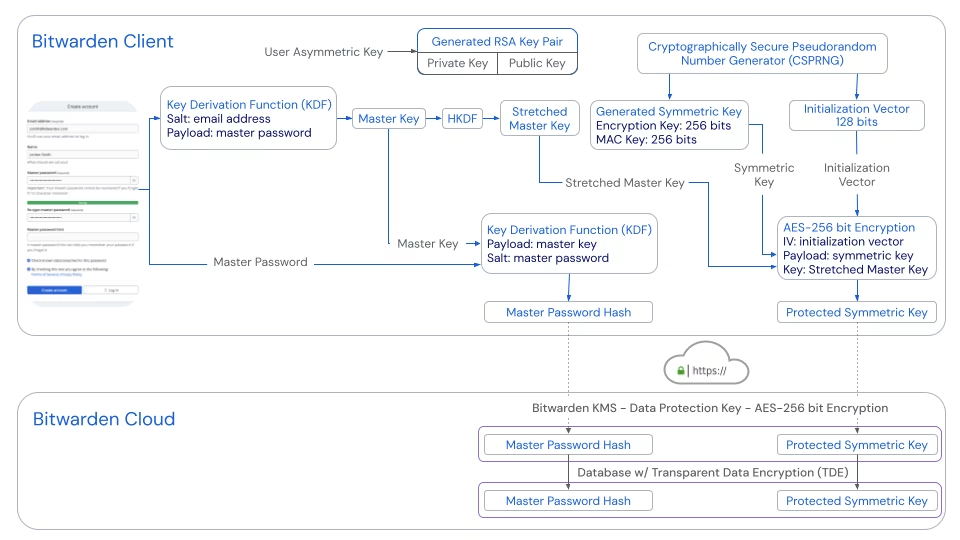
Note
You can visit my git repository for an example pin bruteforcer made for this specific case.
Warning
Warning: Bruteforcing with 60000 iterations can quickly heat up your computer.
$ ./bitwarden-pin
✔ PIN FOUND: 6328744- We can decrypt the
data.jsonwith BitwardenDecrypt.py , albeit with a patch.
# PATCHING
$ sed -i 's/_masterPassword_masterKeyEncryptedUserKey/_pinUnlock_pinKeyEncryptedUserKeyPersistent/' BitwardenDecrypt.py

$ BitwardenDecrypt.py
Enter Password (nvu960282@gmail.com): 6328744- Which gives us the following results:
{
    "items": [
        {
            "id": "b295c6f3-7487-4ff6-9add-b391007d3b4f",
            "organizationId": null,
            "folderId": null,
            "edit": true,
            "viewPassword": true,
            "permissions": {
                "response": {
                    "delete": true,
                    "restore": true
                },
                "delete": true,
                "restore": true
            },
            "organizationUseTotp": false,
            "favorite": false,
            "revisionDate": "2025-11-10T07:35:57.2733333Z",
            "type": 1,
            "name": "darkforums.st",
            "notes": null,
            "collectionIds": [],
            "creationDate": "2025-11-10T07:35:57.2733333Z",
            "deletedDate": null,
            "archivedDate": null,
            "reprompt": 0,
            "key": null,
            "login": {
                "username": "harryth3p0ttErr1001",
                "password": "eoCNohGAtdNpVVKkonq625x45oWaJRzp",
                "passwordRevisionDate": null,
                "totp": null,
                "autofillOnPageLoad": null,
                "uris": []
            }
        },
        {
            "id": "56173f3e-8a15-4faf-a9e4-b391007d5cec",
            "organizationId": null,
            "folderId": null,
            "edit": true,
            "viewPassword": true,
            "permissions": {
                "response": {
                    "delete": true,
                    "restore": true
                },
                "delete": true,
                "restore": true
            },
            "organizationUseTotp": false,
            "favorite": false,
            "revisionDate": "2025-11-10T07:36:25.9566667Z",
            "type": 1,
            "name": "chat",
            "notes": null,
            "collectionIds": [],
            "creationDate": "2025-11-10T07:36:25.9566667Z",
            "deletedDate": null,
            "archivedDate": null,
            "reprompt": 0,
            "key": null,
            "login": {
                "username": "some0n3umeE7",
                "password": "h9lLZOFEkgk2F4MKL4v0pXBKTrT",
                "passwordRevisionDate": null,
                "totp": null,
                "autofillOnPageLoad": null,
                "uris": []
            }
        }
    ]
}- We can see the credentials to
darkforums.st
Answer: harryth3p0ttErr1001:eoCNohGAtdNpVVKkonq625x45oWaJRzp
Question 7
[7]. In the second chat application in Q2, what is the username (handle) of the suspect and their contact? (Case Sensitive)
Format: uS3rNaME13, c0nT4cTn4m3
==>- Now we have to inspect qTox’s database, which is stored in
C:\Users\windows\AppData\Roaming\tox. - We can copy all of these files over to our environment with the credentials found in Question 6.
"username": "some0n3umeE7",
"password": "h9lLZOFEkgk2F4MKL4v0pXBKTrT"- Opening up qTox with our environment, we can see that the suspect’s user name is
some0n3umeE7and their contact isgr4bf00d123.
Answer: some0n3umeE7, gr4bf00d123
Question 8
[8]. What was the first time the suspect sent a message to their contact in Q7? (UTC / 24 hours format)
Format: YYYY-MM-DD HH:MM:SS
==>- Looking inside the chatlog:

- We can see that the first time the suspect sent a message to their contact was at
2025-11-10 12:34:17, which converting to UTC would be2025-11-10 05:34:17
Answer: 2025-11-10 05:34:17
Question 9
[9]. The suspect deleted crucial evidence from his computer using a specific executable file. What is the name of this file?
Format: filename.ext. Example: del.exe, remove.bat, erase.sh
==>- Looking back at our Artifacts in
Downloads, we see an executable forSDelete - SDelete is a command line utility that takes a number of options. In any given use, it allows you to delete one or more files and/or directories, or to cleanse the free space on a logical disk. SDelete accepts wild card characters as part of the directory or file specifier. (https://learn.microsoft.com/en-us/sysinternals/downloads/sdelete )
- This requires the suspect to use the Terminal. Which we can read the logs inside
C:\Users\windows\AppData\Roaming\Microsoft\Windows\PowerShell\PSReadLine\ConsoleHost_history.txt, which reads:
wmic shadowcopy call create Volume="C:\\"
clear
C:\Users\windows\Downloads\SDelete\sdelete.exe -s -r C:\Users\windows\Documents\data\idk\hehehehe\
C:\Users\windows\Downloads\SDelete\sdelete.exe -s -r C:\Users\windows\Documents\data\idk\hehehehe
clear
vssadmin delete shadows /all
clear
shutdown /s /t 0Answer: sdelete.exe
Question 10
[10]. What was the folder or file deleted by the suspect using the executable in Q9? Provide full path.
Format: full path. Example: C:\Users\User\Documents\file.txt, C:\Program Files\App\Something
==>- Reading the logs again, the suspect ran
C:\Users\windows\Downloads\SDelete\sdelete.exe -s -r C:\Users\windows\Documents\data\idk\heheheheAnswer: C:\Users\windows\Documents\data\idk\hehehehe
Question 11
[11]. The client (the company) needs to know what data did the suspect trying to sell. Provide the encryption key in the leaked environment config file.
Format: ranD0m_s7r!nG123
==>- To get the leaked environment config file, we would need to inspect the
hehehehefolder, which has been overwritten bysdelete.exe, but reading the logs again shows us interesting activities from the suspect.
wmic shadowcopy call create Volume="C:\\"
vssadmin delete shadows /all- The suspect created a Shadow Copy before overwriting the directory, then delete it after. However, since it was deleted normally, the data is still recoverable.
- After a quick lookup online, I found this blog: https://nullsec.us/carving-for/ , which says you can carve out the Shadow Copy from the Raw Disk Image.
- We will be using
vss_carver(https://github.com/mnrkbys/vss_carver) , for this job.
Note
You can find a quick installation script in my git repository .
- We will then carve out the Shadow Copy like the blog instructed.
$ python3 vss_carver.py -t raw -o 122683392 -i evidences.raw -c ./catalog -s ./store
vss_carver 20200312- After that, we can mount the Shadow Copy Image with
vshadowmount.exefrom https://github.com/mnrkbys/libvshadow-vss_carver . - This will require
dokan1.dll, which you can get here: https://github.com/dokan-dev/dokany/releases/tag/v1.5.1.1000
$ vshadowmount.exe -o 122683392 -c .\catalog -s .\store .\evidences.raw H:\- After that, we can load the Artifact
H:\VSS2in FTK Imager to find the deletedhehehehefolder.
- The
conf.zipis password-protected. And the password to it,pw.txt, is locked behind EFS (Encrypted File System).
- A quick look up gives us this blog: https://github.com/gentilkiwi/mimikatz/wiki/howto-%7E-decrypt-EFS-files .
- To decrypt it, we need the following:
SystemCertificates,CryptoandProtectfolders of the user. We can find these insideC:\Users\windows\AppData\Roaming\Microsoft- The user password.
- To get the user’s password, we can extract the NTML hash inside
C:\Windows\System32\configwithsamdumpy(https://github.com/vincd/samdumpy )
$ python3 samdum.py 'C:\Windows\System32\config\SAM' 'C:\Windows\System32\SYSTEM'
windows
01001480d4000000e40000001400000044000000020030000200000002c014004400050101010000000000010000000002c01400ff070f00010100000000000507000000020090000400000000002400440002000105000000000005150000003961006be926432ecf1fe7fee9030000000038001b030200010a00000000000f0300000000040000dea22867213ed2af19ad5d79b0c107292756fc20d8ad66f610f268fadf2af80f00001800ff070f0001020000000000052000000020020000000014005b0302000101000000000001000000000102000000000005200000002002000001020000000000052000000020020000770069006e0064006f0077007300000001020000070000000200020000000000fdea606e1334c58b993830ba1012d09902000200100000007a13798605ee9e704943dc5304699cab940cab1a9617ff5c4ed44228dcca127898f55d7b48ae13161fc312f4e27579c40200020000000000617355284848fd52c27bd4b737b6b7cd0200020000000000cb7622f762e3e850c04ef0e87fb47709
2 268 24 0200020000000000fdea606e1334c58b993830ba1012d099
  NT hash:
2 292 56 02000200100000007a13798605ee9e704943dc5304699cab940cab1a9617ff5c4ed44228dcca127898f55d7b48ae13161fc312f4e27579c4
  NTLM hash: 110d0c51e144d36fb7e4f9e012fbb888
2 348 24 0200020000000000617355284848fd52c27bd4b737b6b7cd
  NT hash history:
2 372 24 0200020000000000cb7622f762e3e850c04ef0e87fb47709
NTLM hash history:- So our NTLM hash is
110d0c51e144d36fb7e4f9e012fbb888 - Using this site
, we can look up the hash and get the original password.

- Our password is
hello123 - Following the blog, we need to make our certificate from the Artifacts to decrypt
pw.txt


- After that, we mount the Shadow Copy image with read-write permission to
D:/so we can decryptpw.txt
- So the password to the zip file is
x707iVDo9vB82XzQ1m6T89i3x76FpxIX - After unlocking the zip file, we are met with:
.
├── application_config.ini
├── production_config.yaml
├── production_credentials.json
├── production.env
└── server_config.xmlInside production.env:
# Production Environment Variables
# CONFIDENTIAL - DevOps Team Only
# Last Updated: 2025-11-09

# Database Configuration
DB_HOST=db-prod-01.techvault.local
DB_PORT=5432
DB_NAME=techvault_prod
DB_USER=prod_admin
DB_PASSWORD=Pr0dAdm!n#SecurePass2025_12319872@@

# Redis Configuration
REDIS_HOST=redis-prod.techvault.local
REDIS_PORT=6379
REDIS_PASSWORD=R3d!sP@ss2024Secure

# API Keys
STRIPE_API_KEY=sk_live_WW5fQTZO4kgRyz3NLWU0RIQY
SENDGRID_API_KEY=SG.VlooaueECoc7q9sS6tJ11s
TWILIO_ACCOUNT_SID=ACba76a1172846d1cc8192d126ad93266d
TWILIO_AUTH_TOKEN=c0ebd304ea6016d1be9561417920efbe

# AWS Credentials
AWS_ACCESS_KEY_ID=AKIAQE43IP4T2EVHCRAO
AWS_SECRET_ACCESS_KEY=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
AWS_REGION=us-east-1

# JWT Secret
JWT_SECRET=jiDEY3hRxBpole9SrshjIXMtrFTha571OHpuhq1Q4xHcyFCDcF4B31eZ0PVyYSby

# Encryption Key
ENCRYPTION_KEY=ezNXLpkREd04OMRHck8Z0aDVIpWiuUpzAnswer: ezNXLpkREd04OMRHck8Z0aDVIpWiuUpz
Question 12
[12]. Following the Q10, provide the credential to access the database of the Manager.
Format: username:password
==>- Reading
production_credentials.json, we get our answer:
{
      "username": "sjohnson",
      "password": "Secur3T3ch#2024",
      "email": "sjohnson@techvault.com",
      "role": "Manager"
},Answer: sjohnson:Secur3T3ch#2024
Conclusion
$ nc 127.0.0.1 1259
== proof-of-work: disabled ==

    Welcome to Case Beta! Answer 12/12 questions correctly to get the flag.
    You will be timed out for increasing duration after every 5 wrong submissions.

[1]. The suspect used some chat applications. Provide the name of them in alphabetical order separated by comma.
Format: app1, app2, app3. Example: discord, telegram, whatsapp
==> DeltaChat, qTox
CORRECT!
[2]. In the first chat application in Q2, what is the username (handle) of the suspect and their contact? (Case Sensitive)
Format: uS3rNaME13, c0nT4cTn4m3
==> weirdestasian1661, theh1dd3n0ne
CORRECT!
[3]. What was the first time the suspect received a message from their contact in Q2? (UTC / 24 hours format)
Format: YYYY-MM-DD HH:MM:SS
==> 2025-11-02 05:08:25
CORRECT!
[4]. Two suspects were talking about a location to receive a package. Provide the address mentioned in the chat.
Format: full address. Example: 123 Example St, Example City, EX 12345
==> Insert Coin Arcade, Rockford Hills
CORRECT!
[5]. The suspect has an email address. What is the email address?
Format: name@domain. Example: user@example.com
==> nvu960282@gmail.com
CORRECT!
[6]. The suspect had a credential of a black market website. What is the credential?
Format: username:password
==> harryth3p0ttErr1001:eoCNohGAtdNpVVKkonq625x45oWaJRzp
CORRECT!
[7]. In the second chat application in Q2, what is the username (handle) of the suspect and their contact? (Case Sensitive)
Format: uS3rNaME13, c0nT4cTn4m3
==> some0n3umeE7, gr4bf00d123
CORRECT!
[8]. What was the first time the suspect sent a message to their contact in Q7? (UTC / 24 hours format)
Format: YYYY-MM-DD HH:MM:SS
==> 2025-11-10 05:34:17
CORRECT!
[9]. The suspect deleted crucial evidence from his computer using a specific executable file. What is the name of this file?
Format: filename.ext. Example: del.exe, remove.bat, erase.sh
==> sdelete.exe
CORRECT!
[10]. What was the folder or file deleted by the suspect using the executable in Q9? Provide full path.
Format: full path. Example: C:\Users\User\Documents\file.txt, C:\Program Files\App\Something
==> C:\Users\windows\Documents\data\idk\hehehehe
CORRECT!
[11]. The client (the company) needs to know what data did the suspect trying to sell. Provide the encryption key in the leaked environment config file.
Format: ranD0m_s7r!nG123
==> ezNXLpkREd04OMRHck8Z0aDVIpWiuUpz
CORRECT!
[12]. Following the Q10, provide the credential to access the database of the Manager.
Format: username:password
==> sjohnson:Secur3T3ch#2024
CORRECT!
Congrats! Here is your flag: idk i forgor